ProjectionLab Alternative: Calm Sea vs ProjectionLab Compared (2026)
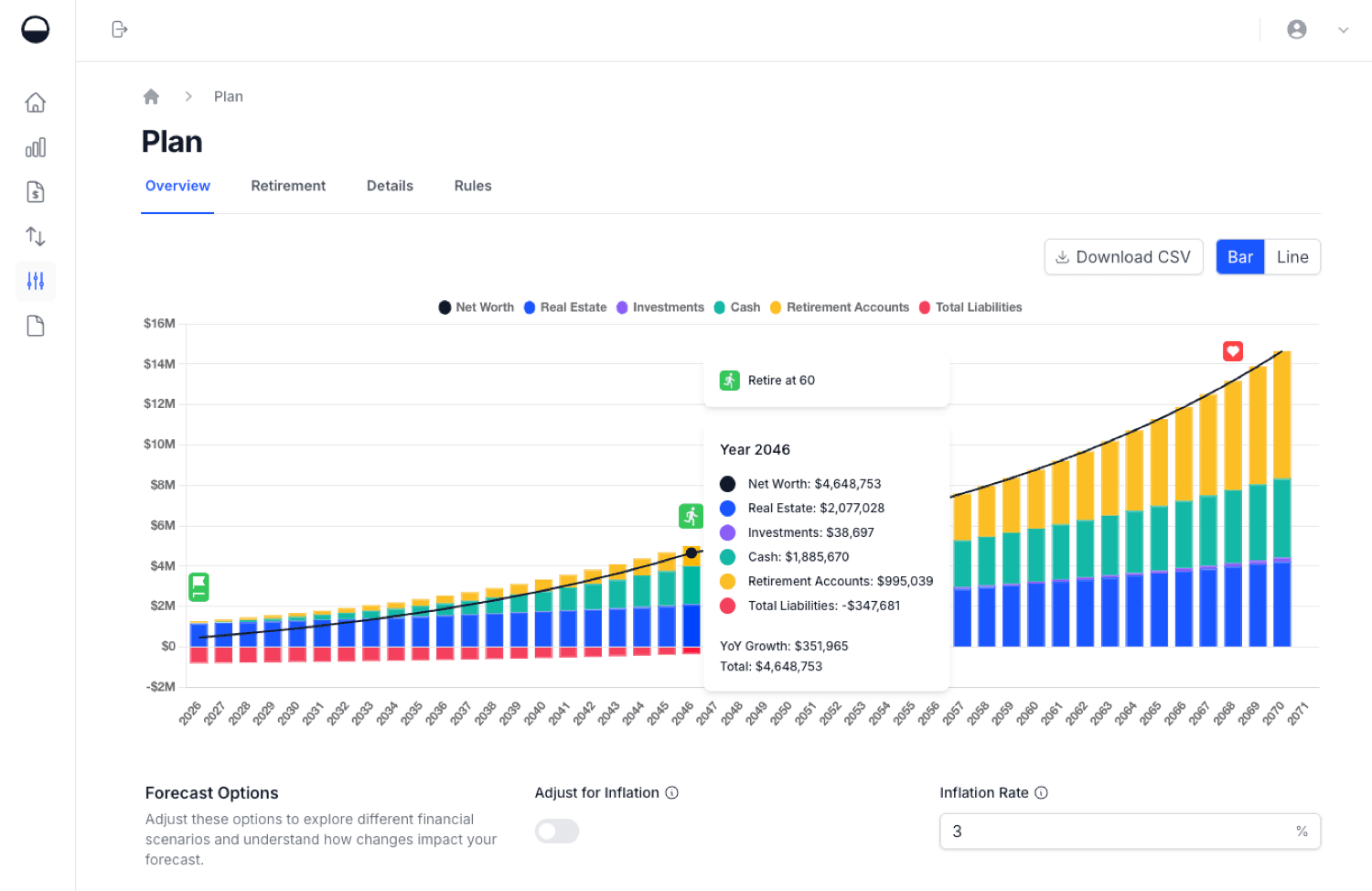
Table of Contents
- Quick answer
- Introduction
- Why People Look for a ProjectionLab Alternative
- Calm Sea vs ProjectionLab: Feature Comparison
- Where ProjectionLab Is the Stronger Choice
- Where Calm Sea Is the Stronger Choice
- Who Each Tool Is Best For
- Other ProjectionLab Alternatives Worth Knowing
- How to Choose a ProjectionLab Alternative
- Frequently Asked Questions
Quick answer
The best ProjectionLab alternative depends on why you're looking. Calm Sea suits people who want a simpler plan that puts property and loans at the centre, with retirement drawdown planning and Monte Carlo simulation. ProjectionLab remains the deeper tool for detailed tax modelling, Roth conversions and historical backtesting. Boldin suits US retirees who want tax planning with account linking, and Empower suits people who want free, automatic net worth tracking.
ProjectionLab features and prices checked October 2026 on its own website.
Introduction
ProjectionLab is one of the best-known financial planning tools in the FIRE community, and for good reason. It models a whole financial life in detail, and its free plan is generous. Yet plenty of people still search for a ProjectionLab alternative. Some find the depth more than they need. Some want property and mortgages to sit at the centre of their plan. Others want a different price point, or simply want to compare before they commit time to building a plan.
This guide compares Calm Sea and ProjectionLab side by side: what each one does, what each one costs, and where each is the stronger choice. It's written by the Calm Sea team, so we've tried hard to be fair. ProjectionLab facts come from its own homepage, pricing page and help centre, and we say plainly where it does more than Calm Sea.
If you're comparing a wider field, our roundup of the best FIRE tracking apps covers six options, including Boldin, Empower, Monarch Money and a spreadsheet.
Test your plan with a free Monte Carlo calculator
See how likely your retirement savings are to last across 1,000 simulated markets. No sign-up, no bank linking.
Why People Look for a ProjectionLab Alternative
ProjectionLab is a strong product, so the reasons people look elsewhere are mostly about fit rather than flaws.
The learning curve. ProjectionLab can model almost anything: milestones, multiple plans, tax strategies, estate planning and more. That flexibility takes time to set up. Someone who mainly wants to see their net worth projected forward, and when they could stop working, may not need every lever.
Property-heavy finances. Many people's biggest asset is their home, often with an investment property and a mortgage or two alongside it. ProjectionLab handles real estate well, but it's one part of a much larger model. Some people want a tool where property, loans and equity are front and centre.
Price and plan structure. ProjectionLab's free Basic plan includes Monte Carlo simulation and historical backtesting. Many features, including cash-flow projections, tax estimation, withdrawal strategies and multiple plans, sit in Premium at $129 a year. That's good value for heavy users, but it's an annual commitment, and there's no monthly option listed.
Wanting a second opinion. A plan is only as good as its assumptions. Running the same numbers through a second tool is a sensible way to check that a projection isn't the product of one model's quirks.
Calm Sea vs ProjectionLab: Feature Comparison
The table compares the two tools on the points that matter most when choosing a ProjectionLab alternative. "Not stated" means the vendor's own website doesn't mention the capability. It doesn't necessarily mean the feature is missing.
| Feature | Calm Sea | ProjectionLab |
|---|---|---|
| Free plan | Yes, Simple (no saving) | Yes, Basic |
| Paid price | $9/mo or $89/yr | $129/yr (Premium) |
| Monthly billing | Yes | Not stated |
| Monte Carlo | Yes | Yes, free plan |
| Historical backtest | Not advertised | Yes, free plan |
| Property | Yes, equity and LVR | Yes, homes and rentals |
| Mortgages and debts | Linked to assets | Yes, on real assets |
| Retirement drawdown | Yes | Withdrawal strategies |
| Cash flow | Yes | Premium |
| Tax estimation | Yes | Premium |
| Country coverage | Yes, several supported | US, presets on Premium |
| Bank account linking | No direct linking | No direct linking |
| Progress tracking | Update values any time | Journal vs projections |
A few notes on the table:
- Pricing for Calm Sea comes from its pricing page. ProjectionLab's Basic plan is free, Premium is $129 a year and Pro, aimed at financial professionals, is $549 a year.
- Account linking: ProjectionLab's help centre says it doesn't link directly to financial accounts, but plugins can pull balances from tools such as YNAB, Lunch Money and Monarch Money. Calm Sea has no bank linking or plugins; everything comes from numbers you enter.
- Country coverage: ProjectionLab is built around the US tax system by default. Its Premium plan adds "International Planning", and its homepage names tax presets for Canada, the United Kingdom, Australia, Germany and the Netherlands. Calm Sea doesn't tie projections to one country's accounts or rules. You enter your own values and growth rates, so the projections aren't built around any single country's accounts or tax rules.
Where ProjectionLab Is the Stronger Choice
An honest comparison has to say where the other tool does more. ProjectionLab is ahead in several areas.
Tax modelling and optimisation
ProjectionLab's Premium plan includes tax estimation, tax optimisation, Roth conversions, capital gains harvesting and ACA subsidy modelling. For a US household planning an early retirement, the order in which accounts are drawn down and taxed can matter a great deal, and ProjectionLab is built to model it. Calm Sea doesn't advertise tax modelling, so if detailed tax planning is central to your decision, ProjectionLab (or Boldin) is the better fit today.
Historical backtesting
Alongside Monte Carlo simulation, ProjectionLab can test a plan against historical market sequences, even on the free plan. Seeing how a plan would have fared starting in, say, 1966 or 2000 is a useful complement to randomised simulations.
Depth and flexibility
Multiple plans, compare mode, milestones, estate planning and detailed what-if scenarios make ProjectionLab one of the most flexible planners available. If you enjoy building a detailed model and revisiting it often, that depth is the point.
Advisor tools
ProjectionLab's Pro plan includes client management and an advisor dashboard, which matters if you're a planner working with clients.
Where Calm Sea Is the Stronger Choice
Calm Sea takes a different approach: a clear, long-range picture of your whole net worth, built from numbers you enter, without needing to master a large model first.
Property and loans at the centre
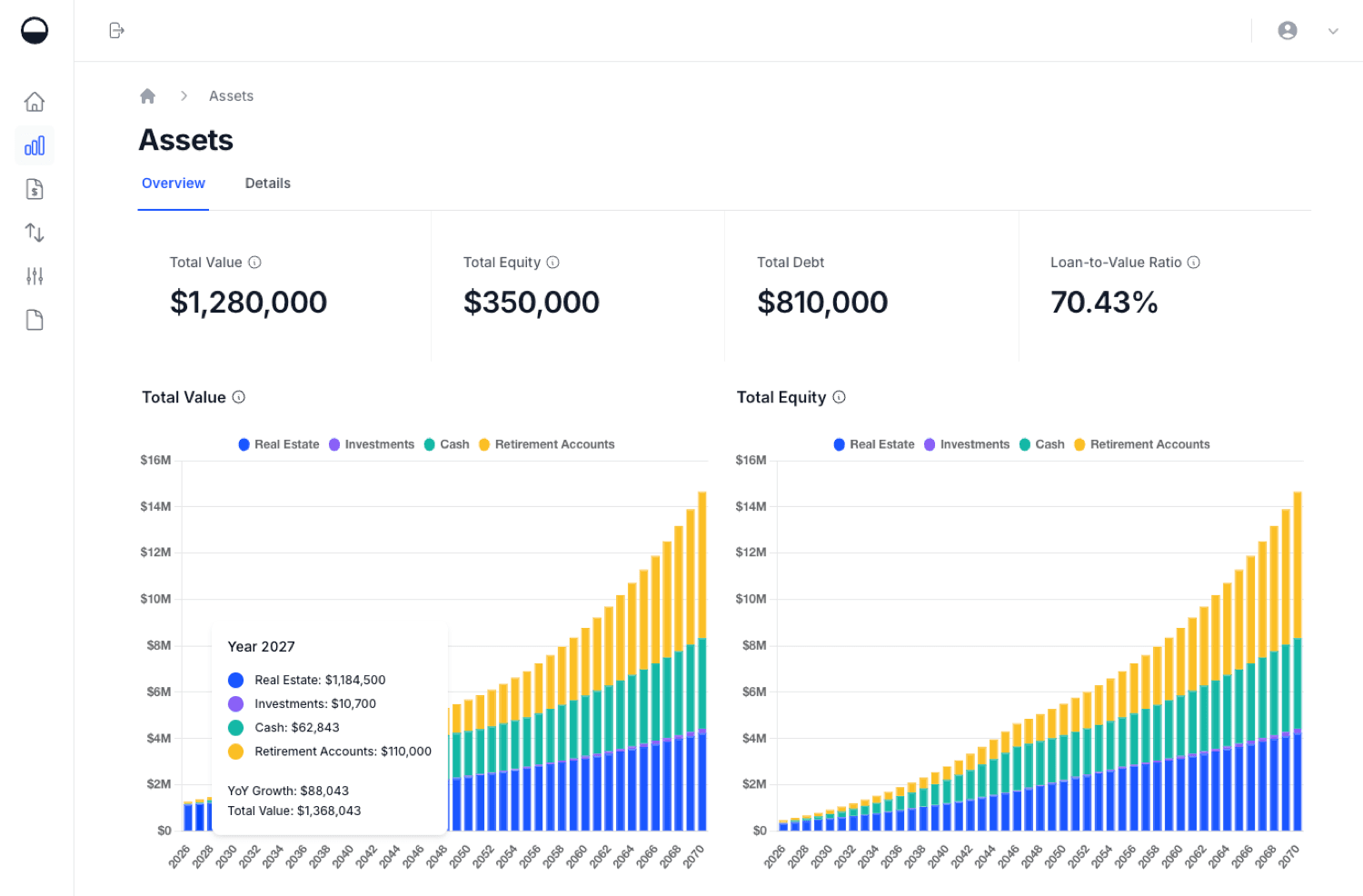
Calm Sea treats real estate as a core asset class rather than an add-on. You add each property with its value and growth rate, link the mortgage that's secured against it, and the dashboards show value, equity, debt and loan-to-value ratio (LVR) over time. Our real estate guide walks through the setup. For people whose wealth is mostly in a home and an investment property, that view is often the most useful one.
Accumulation and drawdown in one view
Calm Sea projects your net worth forward while you build wealth, then models the drawdown phase: how your savings and income sources could fund your spending through retirement, year by year, and how long your money could last. A Monte Carlo simulation then tests the plan across many randomised market scenarios, so you can see how likely it is to hold up rather than relying on a single growth rate.
Simple to set up
You add assets, liabilities, income and expenses in a few sections, each with a value and a growth rate, and the projections appear straight away. Projections can be shown in today's dollars with an inflation setting, and you can test scenarios to see how a change affects your timeline. There's less to learn before you get a useful answer.
Monthly pricing
Calm Sea's paid plan is $9 a month, or $89 a year, so you can try a month without an annual commitment. The free Simple plan lets you create projections, but saving your data needs the paid plan.
Private by design
Like ProjectionLab, Calm Sea never asks for bank logins. There's no read access to your accounts and no syncing. The trade-off is that you update balances yourself, which many people do monthly or quarterly as a check-in. Our guide on how to track net worth covers a simple routine.
See everything it tracks on the Calm Sea FIRE tracking app page.
Who Each Tool Is Best For
| If you want to... | Better fit |
|---|---|
| Model US taxes and Roth conversions | ProjectionLab |
| Backtest against market history | ProjectionLab |
| Build many detailed plans and scenarios | ProjectionLab |
| Manage advisory clients | ProjectionLab |
| Put property, mortgages and LVR first | Calm Sea |
| Get a clear projection with less setup | Calm Sea |
| Plan accumulation and drawdown together | Calm Sea |
| Pay monthly rather than yearly | Calm Sea |
ProjectionLab is best for detail-oriented planners, especially in the US, who want the deepest FIRE modelling available, including taxes and withdrawal strategies, and who are happy to invest time building their plan. Its free plan is a strong place to start.
Calm Sea is best for people whose finances include property and loans, who want a clear long-range view of when they could reach financial independence and how long their money could last, and who prefer a simpler setup without linking bank accounts.
Plenty of people use both: a detailed model in one tool and a quick, property-focused check in another.
Other ProjectionLab Alternatives Worth Knowing
Calm Sea isn't the only option. Depending on what you need, these ProjectionLab alternatives may fit better.
Boldin (formerly NewRetirement)
Boldin focuses on retirement planning. Its free Basic plan lets you build a plan, and PlannerPlus, at $168 a year after a 14-day free trial, adds Monte Carlo analysis, account linking through data aggregators, state and federal tax projections and a Roth conversion explorer (Boldin pricing, checked October 2026). It's strongest for US households planning a traditional or early retirement. Our Boldin alternative guide compares it with Calm Sea in detail.
Empower Personal Dashboard
Empower's free dashboard links to your accounts and tracks net worth automatically, with a retirement planner on top. It's a good fit if you want automatic tracking and don't mind sharing account access.
A spreadsheet
A spreadsheet gives you full control and costs nothing. The trade-off is that you build every formula yourself, and Monte Carlo simulation is hard to do well in a spreadsheet.
For a fuller side-by-side look, see our comparison of the best FIRE tracking apps.
How to Choose a ProjectionLab Alternative
A few questions usually settle the choice.
What's the main question you want answered? If it's "when could I retire, and will my money last?", a projection with drawdown and Monte Carlo covers it. If it's "which accounts should I draw from first to minimise tax?", you need detailed tax modelling.
How much of your wealth is in property? If most of it is, choose a tool that shows equity, debt and LVR clearly, not just a single property value.
Are you willing to link accounts? Automatic syncing saves time but shares access. Manual entry keeps things private but needs regular updates.
How much time will you spend? Detailed planners reward people who enjoy modelling. Simpler tools suit people who want an answer and a regular check-in.
What are your withdrawal assumptions? Whichever tool you choose, the withdrawal rate drives the result. The 4% rule is a common starting point, and our guide to the safe withdrawal rate explains why the right rate depends on your timeline. You can test different rates in the free safe withdrawal rate calculator, which includes a Monte Carlo simulation, before signing up for anything.
See when you could reach financial independence
Project your net worth, property and loans forward, plan your drawdown and test it with Monte Carlo simulation. Free to start, no bank linking.
Frequently Asked Questions
What is the best ProjectionLab alternative?
It depends on what you need. For a simpler, manual-entry plan centred on property and loans, with drawdown planning and Monte Carlo simulation, Calm Sea is a strong fit. For US tax planning with account linking, Boldin is the closest match. For free, automatic net worth tracking, Empower Personal Dashboard is popular.
Is ProjectionLab free?
Yes, ProjectionLab has a free Basic plan that includes forecasting, Monte Carlo simulations and historical backtesting. Premium, at $129 a year as of October 2026, adds cash-flow projections, tax estimation, withdrawal strategies, Roth conversions and multiple plans.
Does Calm Sea have Monte Carlo simulation like ProjectionLab?
Yes. Calm Sea tests your retirement plan across many randomised market scenarios to show how likely it is to hold up. ProjectionLab also offers historical backtesting against past market sequences. You can also try a Monte Carlo simulation for free, without an account, in the safe withdrawal rate calculator.
Do Calm Sea or ProjectionLab link to my bank accounts?
Neither links directly to bank accounts. Calm Sea is entirely manual-entry. ProjectionLab is manual too, but its plugins can import balances from some budgeting tools.
Can I use these tools outside the US?
Yes. ProjectionLab's Premium plan includes international planning with tax presets for several countries. Calm Sea isn't tied to one country's accounts or rules; you enter your own values and growth rates, so it can be used wherever you live.
Calm Sea is a personal finance planning tool. Nothing in this article constitutes financial advice. ProjectionLab and Boldin features and prices were checked on each company's website in October 2026 and may have changed since. Always conduct your own due diligence and consult a qualified financial adviser before making financial decisions.