Best Monte Carlo Retirement Calculators in 2026: 6 Tools Compared

Table of Contents
- Quick answer
- Introduction
- What Monte Carlo Adds Over the 4% Rule
- Best Monte Carlo Retirement Calculators Compared
- The Tools in Detail
- Historical Simulators: FIRECalc and cFIREsim
- How to Choose a Monte Carlo Retirement Calculator
- Frequently Asked Questions
Quick answer
The best Monte Carlo retirement calculator depends on how much detail you want and whether you'll link your accounts. Calm Sea combines Monte Carlo simulation with drawdown planning across property, loans and investments, with no bank linking. Empower's free Retirement Planner runs 5,000 scenarios on linked accounts. Boldin adds US tax and Roth planning on its paid plan, and ProjectionLab includes Monte Carlo on its free tier. For a quick portfolio-only check, Portfolio Visualizer and Vanguard's Nest Egg calculator are free.
Features and prices checked October 2026 on each product's own website.
Test your retirement plan with Calm Sea
Project your savings, property and loans to retirement, plan the drawdown, and see how the plan holds up with Monte Carlo simulation. No bank linking.
Introduction
A Monte Carlo retirement calculator answers a different question from a standard retirement calculator. Instead of "how much will I have?", it asks "how likely is my money to last?" It does this by running your plan through thousands of randomised market paths and counting how many of them succeed.
That makes Monte Carlo simulation one of the most useful stress tests in retirement planning, but the tools that offer it vary a lot. Some test only a portfolio and a withdrawal amount. Others model your whole financial life, including Social Security, property, debts and taxes. Some are free with no sign-up, and others sit behind a paid plan or need your bank logins.
This guide explains what Monte Carlo simulation adds over a fixed rule like the 4% rule, then compares six Monte Carlo calculators, plus two popular historical simulators, on features, price and who each one suits.
What Monte Carlo Adds Over the 4% Rule
The 4% rule says you can withdraw 4% of your portfolio in the first year of retirement, raise that amount with inflation each year, and have a high chance of lasting 30 years. It's a useful starting point, but it's a single historical finding. It assumes a 30-year retirement, a stock and bond mix, and US market history.
A straight-line projection has a different problem. If you assume your portfolio earns the same return every year, a plan either works or it doesn't. Real markets don't behave like that. The order of returns matters as much as the average, and a run of bad years early in retirement can do lasting damage even if the long-run average is fine. This is known as sequence of returns risk.
Monte Carlo simulation deals with both problems. It generates thousands of possible return sequences from an assumed average and volatility, runs your withdrawals through each one, and reports the share that don't run out of money. That share is usually called the "probability of success".
A worked example
Here is a hypothetical example to show the difference. The numbers are illustrative, not a forecast.
Assume a $1,000,000 portfolio, a first-year withdrawal of $40,000 (4%) that rises with inflation, and an average real return (after inflation) of 4.5% a year.
- Straight-line projection: with exactly 4.5% every year, the portfolio never runs out. After 30 years it's worth about $1.2 million in today's dollars.
- Monte Carlo simulation: we ran 10,000 simulations with the same 4.5% average but 11% annual volatility. About 85% of them lasted 30 years, and about 69% lasted 40 years.
| First-year withdrawal rate | Lasted 30 years | Lasted 40 years |
|---|---|---|
| 3.5% ($35,000) | About 93% | About 82% |
| 4% ($40,000) | About 85% | About 69% |
| 5% ($50,000) | About 61% | About 43% |
Hypothetical simulation: 10,000 runs, normally distributed real returns averaging 4.5% with 11% volatility, inflation-adjusted withdrawals, no fees or taxes.
The straight-line projection says the plan is safe. The Monte Carlo simulation says it works in most scenarios but fails in roughly one in seven. It also shows how quickly the odds fall with a higher withdrawal rate or a longer retirement. A longer horizon matters for early retirees, which is why Monte Carlo is popular across the different types of FIRE.
You can test withdrawal rates yourself with the free safe withdrawal rate calculator. Our guide to the safe withdrawal rate explains the research behind these numbers.
What a Monte Carlo result doesn't tell you
A probability of success is only as good as its assumptions. Change the average return, the volatility or the inflation rate and the percentage moves, sometimes by a lot. Most simulations also assume you keep spending the same amount whatever markets do, while real retirees often cut back after a bad year.
The financial planning researchers at Kitces have written about this in detail. A result of 70% doesn't mean a 30% chance of running out of money with no warning. It usually means that in some scenarios you'd need to adjust spending along the way. Treat the number as a guide to how much flexibility a plan needs, not as a precise forecast.
Best Monte Carlo Retirement Calculators Compared
The tables below compare the six tools on the points that matter most. "Not stated" means the vendor's site doesn't say, not that the feature is missing.
Simulation and planning features
| Tool | Simulation | Covers | Drawdown | Property and debts |
|---|---|---|---|---|
| Calm Sea | Monte Carlo | Whole net worth | Yes | Yes, with LVR |
| Empower | Monte Carlo, 5,000 runs | Linked accounts | Yes | Linked loans |
| Boldin | Monte Carlo (PlannerPlus) | Full plan | Yes | PlannerPlus |
| ProjectionLab | Monte Carlo and backtesting | Full plan | Yes | Yes |
| Portfolio Visualizer | Monte Carlo, 4 models | One portfolio | Withdrawal rules | No |
| Vanguard Nest Egg | Probability of lasting | One balance | Spending only | No |
Cost and setup
| Tool | Free option | Paid price | Linking | Best for |
|---|---|---|---|---|
| Calm Sea | Simple plan | $9/mo or $89/yr | No | Private, whole plan |
| Empower | Yes | Free | Yes | Free, linked accounts |
| Boldin | Basic | $168/yr | PlannerPlus | US tax and Roth |
| ProjectionLab | Basic | $129/yr | No | Detailed modelling |
| Portfolio Visualizer | Yes, no login | From $360/yr | No | Testing an allocation |
| Vanguard Nest Egg | Yes | None | No | Quick sense check |
The Tools in Detail
Calm Sea
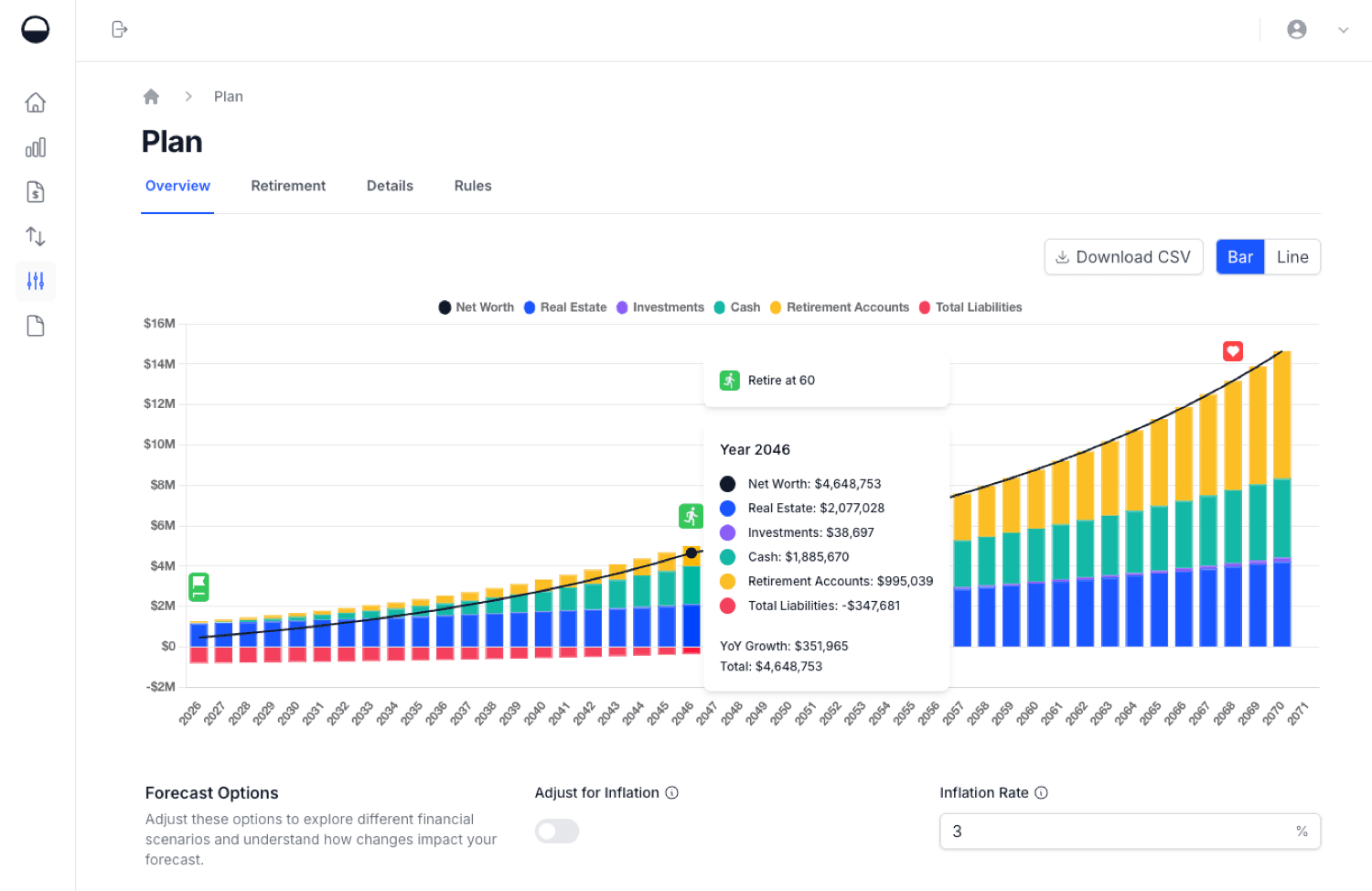
Calm Sea is a financial planning app built around projections. You enter your assets (cash, investments, retirement accounts and property), your liabilities, income and expenses. Calm Sea then projects your net worth forward to retirement.
From there, retirement drawdown planning shows how your savings and income sources could fund your spending year by year, and how long your money could last. A Monte Carlo simulation tests that plan across many randomised market scenarios, so you see a range of outcomes instead of a single line.
Because the simulation runs on your whole plan, it covers more than one investment account. Liabilities can be linked to the asset they're secured against, such as a mortgage against a home, so equity and loan-to-value ratio (LVR) are part of the picture. An inflation setting shows projections in today's dollars.
Calm Sea is manual-entry only. There's no bank linking and no read access to your accounts. That keeps your credentials private and setup quick, but you update balances yourself.
What it doesn't do: Calm Sea doesn't sync with banks and has no dedicated savings-rate metric. The free Simple plan lets you create projections, but saving your data needs the paid plan.
Pricing: Simple is free. Everyday Users is $9 a month or $89 a year (see pricing).
Best for: People who want one plan covering both building and drawing down wealth, including property and loans, without connecting their bank accounts.
Empower Personal Dashboard

Empower Personal Dashboard (formerly Personal Capital) includes a free Retirement Planner. Empower says its Monte Carlo software uses 5,000 scenarios (Empower). You can add life events such as a home purchase or the age you start Social Security, and the planner reports how likely your plan is to succeed.
The planner works best with linked accounts. Once your investment and bank accounts are connected, your balances and allocation update automatically, so the simulation always starts from current numbers. You need to sign up for Empower's free tools to use it.
The trade-off is that the dashboard sits alongside Empower's paid wealth management business, so people with larger portfolios should expect to hear about its advisory services.
Best for: People who are happy to link accounts and want a free Monte Carlo check that stays up to date automatically.
Boldin (formerly NewRetirement)

Boldin focuses on retirement planning for US households. The free Basic plan lets you build a plan and try "what if" scenarios. Monte Carlo analysis is part of PlannerPlus, which costs $168 a year after a 14-day free trial (Boldin pricing).
PlannerPlus also adds account linking, real estate and debt modelling, cash flow planning, a Roth conversion explorer, and state and federal tax projections. Boldin offers a one-off review with one of its advisors for a flat fee of $3,200.
Its tax features are built around the US system, which is its main strength for US retirees and its main limit for everyone else.
Best for: US-based planners who want Monte Carlo, Social Security, tax and Roth conversion modelling in one place.
ProjectionLab

ProjectionLab is a detailed long-range planning tool that's popular with the FIRE community. Its free Basic plan includes Monte Carlo simulation and historical backtesting, which makes it one of the more capable free options.
Premium, at $129 a year, adds features such as tax estimation, withdrawal strategies, Roth conversions and multiple plans. A Pro plan at $549 a year is aimed at financial advisors and coaches. Like Calm Sea, ProjectionLab works from numbers you enter rather than linked accounts.
Best for: People who want very detailed modelling and are prepared to spend time building out a full plan.
Portfolio Visualizer
Portfolio Visualizer is an investment analysis site with a powerful Monte Carlo tool. It tests whether a specific portfolio can survive a withdrawal plan, and it offers four ways to generate returns: random draws from historical returns, your own forecast returns, statistical returns based on each asset's volatility and correlations, and a distribution you specify.
Withdrawals can be a fixed inflation-adjusted amount, a fixed percentage of the balance, a life-expectancy rule similar to required minimum distributions, or a custom cash flow file. The free tier needs no login and is for personal and educational use. Paid plans start at $30 a month, billed annually.
It models one portfolio, not your whole financial life, and doesn't include Social Security, property or debts.
Best for: Investors who want to test how an asset allocation and withdrawal rule hold up.
Vanguard Retirement Nest Egg calculator
Vanguard's Retirement Nest Egg calculator is the simplest tool here. You enter how many years your savings need to last, your current balance, your yearly spending and your stock, bond and cash mix. It returns the probability that your savings will last and a range of projected balances.
It's free and quick, but it doesn't cover income sources, contributions, property or taxes, and Vanguard's page doesn't say how many simulations it runs.
Best for: A fast sense check of whether a savings balance and spending level are in the right range.
Historical Simulators: FIRECalc and cFIREsim
Two well-known free tools in the FIRE community use history instead of random scenarios.
FIRECalc tests your plan against every starting year since 1871. Its logic is that a plan that survived the Great Depression, high inflation and other past downturns is likely to survive the future. It also has a "random performance" option where you enter a mean return and standard deviation. Supporters can unlock extras such as yearly spending changes.
cFIREsim is a free, open-source simulator. It can use all historical data, specific years or constant market growth, and you can set asset allocation and spending rules in detail.
Historical simulation has one big advantage: every scenario actually happened. The downside is that there are only about 150 years of US data, so there are relatively few distinct 30- or 40-year periods to test. Monte Carlo can create far more scenarios, including ones worse than anything in the record. Many planners look at both.
How to Choose a Monte Carlo Retirement Calculator
The best Monte Carlo retirement calculator for you depends on a few practical questions:
- Do you want to test a portfolio or a whole plan? If you just want to check a portfolio and withdrawal rate, Portfolio Visualizer, Vanguard or the safe withdrawal rate calculator will do. If you have property, a mortgage, a pension or Social Security, a full planner such as Calm Sea, Boldin or ProjectionLab gives a more realistic answer.
- Will you link your accounts? Empower and Boldin's paid plan can sync balances automatically. Calm Sea and ProjectionLab work from numbers you enter, so no credentials are shared.
- How much does tax matter to you? Boldin and ProjectionLab's paid plans include tax and Roth conversion modelling for US users.
- Can you see and change the assumptions? A good tool shows its return, volatility and inflation assumptions and lets you change them. If you can't see them, the probability is hard to trust.
- What will you pay? Empower, Portfolio Visualizer's free tier, Vanguard, FIRECalc and cFIREsim cost nothing. Calm Sea, Boldin and ProjectionLab have free plans with paid upgrades from $89 to $168 a year.
Whatever tool you pick, run more than one scenario. Try a lower return, a longer retirement and a slightly higher spending level. A plan that still looks reasonable under tougher assumptions is far more reassuring than one that only works at the default settings. If you're still working out your target, our guide to how much you actually need to retire is a good place to start, and our comparison of the best FIRE tracking apps covers tools for the saving years.
None of these tools replaces personal advice from a qualified professional.
See how long your money could last with Calm Sea
Enter your savings, property, loans, income and expenses, plan your retirement drawdown, and test it with Monte Carlo simulation. Free to start.
Frequently Asked Questions
What is a Monte Carlo retirement calculator?
It's a calculator that runs your retirement plan through thousands of randomised market scenarios and reports the share in which your money lasts. That share is called the probability of success. It shows how sensitive your plan is to market ups and downs, which a single straight-line projection can't.
What is a good probability of success?
There's no single right number. Many planners treat something in the 80% to 90% range as reasonable, as long as you're willing to adjust spending if markets go badly. Aiming for close to 100% usually means saving more or spending less than you may need to.
Is there a free Monte Carlo retirement calculator?
Yes. As of October 2026, Empower's Retirement Planner is free, ProjectionLab's free Basic plan includes Monte Carlo simulation, and Portfolio Visualizer's free tier and Vanguard's Nest Egg calculator need no payment. FIRECalc and cFIREsim are free historical simulators.
Is Monte Carlo better than the 4% rule?
They answer slightly different questions. The 4% rule is a historical rule of thumb for one type of retirement. Monte Carlo simulation tests your own plan, with your own spending, timeline and assumptions, across many possible markets. Many people start with the 4% rule and use Monte Carlo to check how their plan holds up.
Calm Sea is a personal finance planning tool. Nothing in this article constitutes financial advice. The simulation figures above are hypothetical and depend on the stated assumptions. Competitor features and prices were checked on each company's website in October 2026 and may have changed since. Always conduct your own due diligence and consult a qualified financial adviser before making financial decisions.